


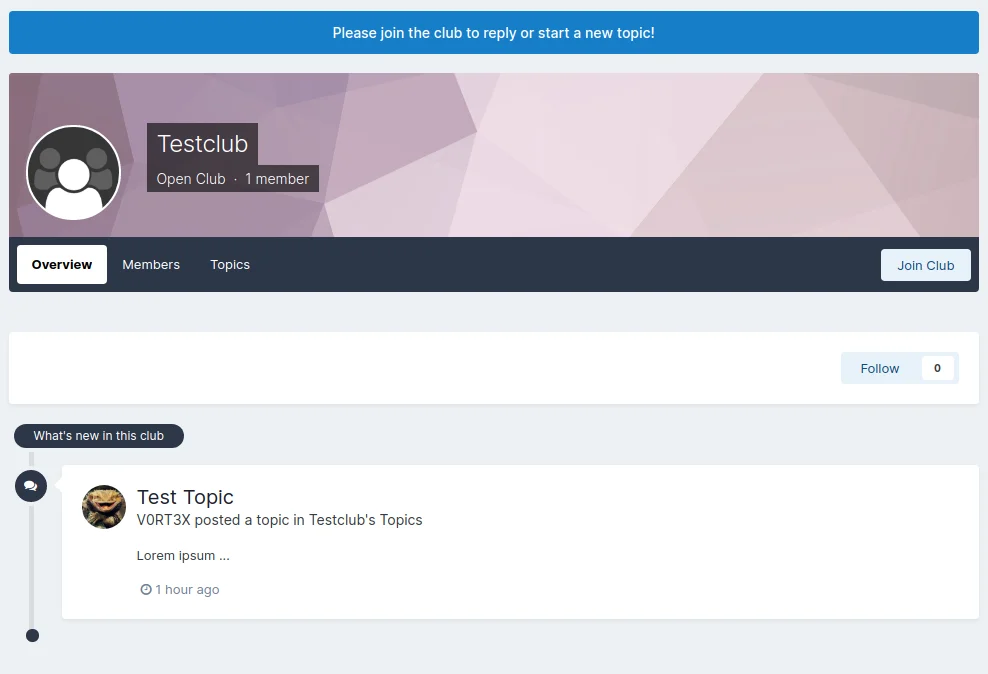
It happens from time to time that members wonder why they can't reply in clubs or download files. And that's where this groundbreaking new plugin comes in 😇
It displays an unmissable button above the club header with a text of your choice, as a phrase of course, which you can change as you wish.
Of course, only users who can join the club will see this button, i.e. guests and existing club members will not.
This was suggested in the English forum, have fun with it ;)
Es kommt ja immer wieder mal vor das Mitglieder sich wundern, warum sie in Clubs nicht antworten oder keine Dateien runterladen können. Und genau da kommt dieses bahnbrechende neue Plugin ins Spiel 😇
Es zeigt über dem Club Header einen nicht zu übersehenden Button mit einem Text eurer Wahl an, natürlich als Phrase die ihr nach Belieben ändern könnt.
Diesen Button sehen selbstverständlich nur Benutzer, die dem Club auch beitreten können, Gäste und bestehende Clubmitglieder also nicht.
Wurde im englischen Forum angeregt, viel Spass damit ;)
You may only provide a review once you have downloaded the file.
There are no reviews to display.